
Compatibility
Minecraft: Java Edition
Platforms
Supported environments


Links
Tags
Creators
Details
✨ Features
THIS IS NOT A CHEAT CLIENT
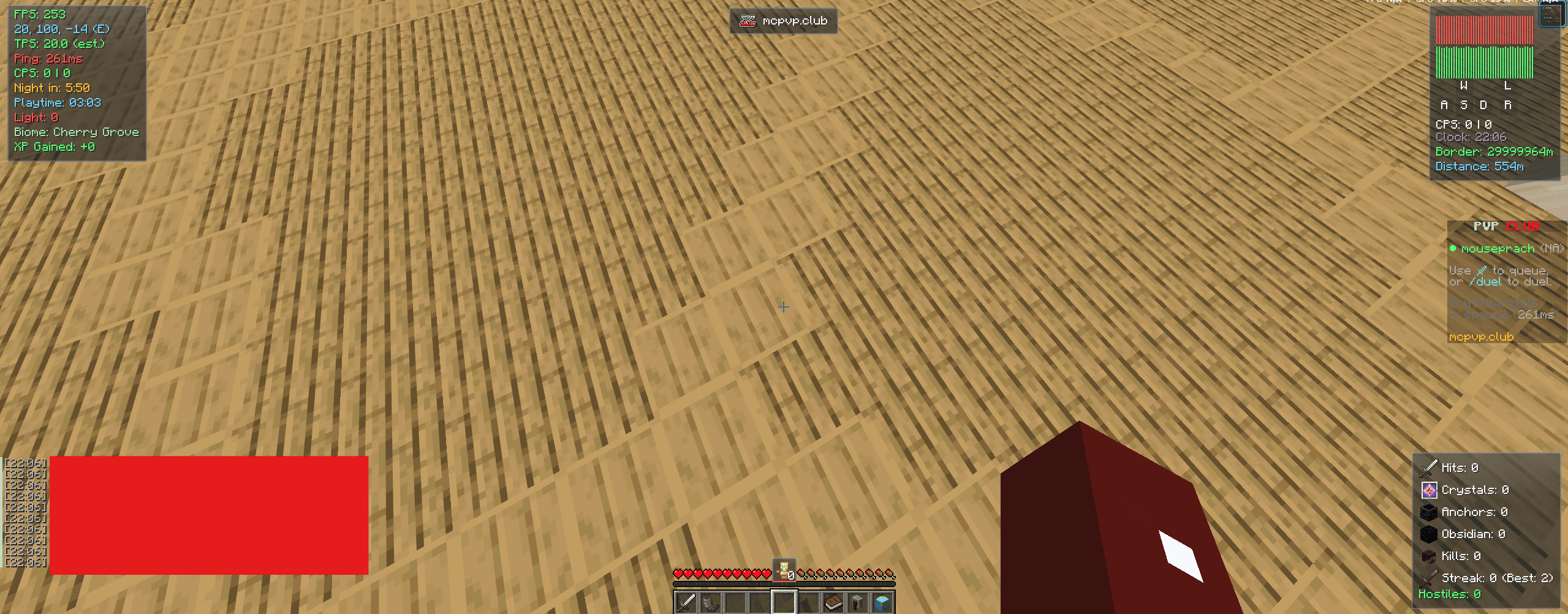
HUD Overlay
- FPS, TPS (estimate), Ping, Ping Graph, Status Graph, and CPS counters
- Coordinates, Clock (12/24-hour), Biome, Light Level, World Border Distance, and Playtime displays
- Armor Durability display with a low-durability warning
- Stats HUD — hits, crystals, anchors, obsidian, and kills, pulled from the Stats tab tracker below
- Hostile Mob Counter, Distance Traveled, and XP Gained trackers
- Combat Timer, plus optional Low Health and Hunger warnings
- Totem Counter, anchored just above the hotbar
- Kill Streak tracker (current streak + personal best)
- Keystrokes display
- Waypoint HUD card and a compass-style Waypoint Navigator strip pointing toward your nearest waypoint
- Server Banner module showing the current server's icon/name
- Optional Hide Boss Bar and Chat Timestamps
- Each element's corner position is configurable independently (Top-Left / Top-Right / Bottom-Left / Bottom-Right), and most can be freely dragged via the dedicated Edit HUD Layout screen
- Optional glass background for a cleaner look
Stats Tracking
- Persistent counters for Hits, End Crystals, Respawn Anchors, Obsidian, and Kills, viewable in their own Stats tab
- Independent reset options for all-time stats and for your best Kill Streak
PvP & Combat
- Hide Crystal Particles — removes end crystal explosion particles for a clearer view during crystal PvP
- Hide Totem Particles — removes the totem-of-undying burst effect
- Hit Marker — a small crosshair pulse (with optional sound) when your attack connects
- Say GG keybind — sends a quick "gg" in chat, with a built-in cooldown to prevent accidental spam
- Purely visual/audio and locally-triggered — no packet or gameplay changes, safe on any server
Waypoints
- Drop a waypoint anywhere with a keybind, or let the client auto-drop one whenever you die
- Death markers are automatically capped so your file doesn't grow forever; manual waypoints are never trimmed
- Waypoints are per-dimension aware and saved locally to
config/craftcloudclient_waypoints.json
Quality of Life
- Hold-to-Zoom — a spyglass-style camera zoom on a keybind, using the vanilla FOV setting (restores automatically on release)
- Full-Bright toggle — a one-click shortcut for vanilla's own Brightness/Gamma slider, remembers your previous setting
- Auto Sprint and Hide Players toggles, each with their own keybind
- Discord Rich Presence — shows your current server/status on your Discord profile while playing
- In-game Update Checker — a banner lets you know when a new version is available
Performance
- FPS Boost preset: capped render distance, reduced entity distance, Fast graphics, no entity shadows, no ambient occlusion
- Reduce Particles
- Disable Clouds
- Disable Rain
- Smooth FPS Limiter
In-game config menu
- Glass-styled UI, opened with a configurable keybind (default: Right Shift)
- Organized into HUD / PvP / Stats / Waypoints / Performance / Keybinds / Theme / Profiles / About tabs
- Built-in settings search bar to jump straight to a setting by name
- Per-tab On All / Close All bulk toggles
- Config Profiles — save, load, and rename full setting snapshots, so you can swap between setups instantly with no restart
- Multiple accent color themes (Cyan, Violet, Rose, Mint, Amber) that retint the whole menu and HUD instantly
- Legacy Config UI toggle — switch the HUD tab between the newer card-grid layout and the original one-row-per-setting list, if you prefer the classic look
- Optional glass-themed reskin of the title screen and vanilla options menus
- Settings apply live and save automatically to
config/craftcloudclient.json - Available in English and Thai
📋 Requirements
- Minecraft 1.21.11
- Fabric Loader 0.18.2+
- Fabric API 0.141.4+1.21.11
ℹ️ Notes
- TPS is a client-side estimate on remote servers (vanilla doesn't send real tick timings over the network); it reads a clean 20.0 on singleplayer/LAN.
- All PvP, combat, zoom, and performance options only change what your own client renders or how it applies vanilla settings — nothing here touches gameplay logic, packets, or other players, so it's safe to use on any server.
- Discord Rich Presence runs automatically for the session and currently has no in-menu toggle.
📄 License
Apache 2.0